
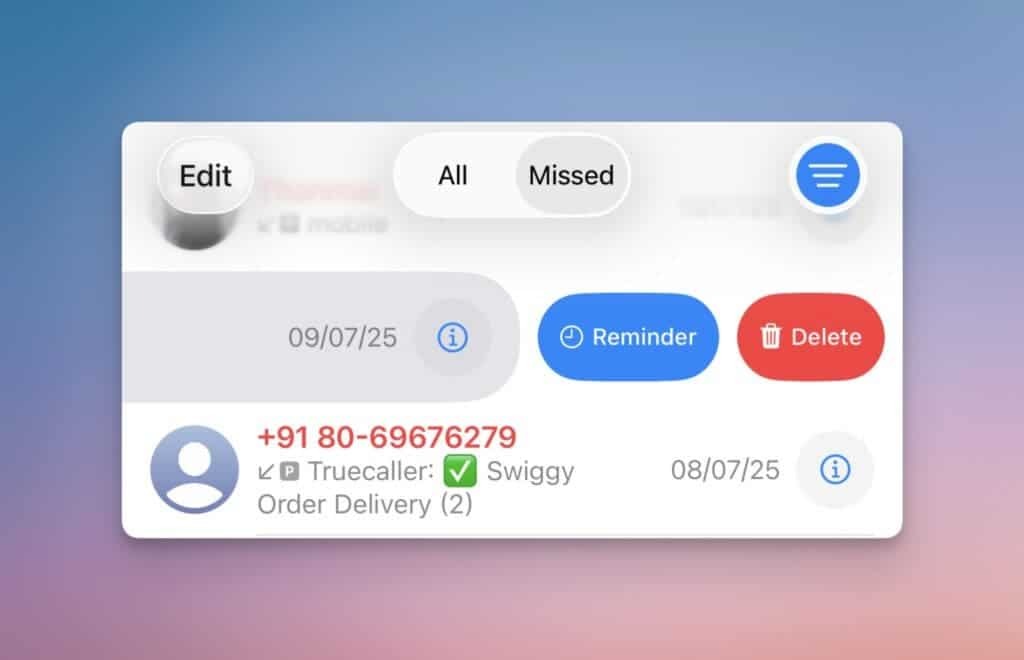
Apple finally added to iOS 26 the long -awaited function of reminders of missing calls and the need to call back.
In the next beta version of iOS 26, a very useful innovation appeared: the function of reminders of missing calls directly in the “Phone” application. According to insiders from Gizchina, this innovation can be one of the most useful additions to iOS 26.
When the function becomes public, to activate it will need to open the “Phone” application, go to the “Recent” tab (the function is implemented only for this tab), then you will need to draw a finger to the left by any entry in the call log, click on the “reminding” button that appeared.
After that, several pre -installed options will appear in the interface:
-
after time;
-
tonight;
-
Tomorrow;
-
Or you can set your time.
The reminder will appear in the upper part of the “reminder” section in the “Phone” application, but only if a new unified model is used. You can also switch layouts using the Filter button in the upper right corner.
It is noted that this reminder is also synchronized with the “reminder” application.
Also, the reminder will be displayed in the “Reminders” application on the “Today” tab. Moreover, in a reminder of the unbearable calls, a quick call button will appear, so you can press it and dial a number directly from the notification.